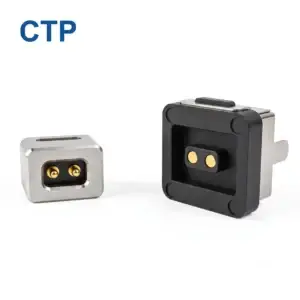
A magnetic pogo pin connector is a spring-loaded electrical connector that uses permanent magnets to align and hold its two halves together. The magnets pull the halves into position, and the spring-loaded pins press against the mating contacts to carry power, data or signals.
This guide is for engineers and product managers choosing a charging or docking interface for a new device. You will learn how the parts work, which specs to check first, and when another connector is the better choice.
Key takeaways
- A magnetic pogo pin connector aligns and holds itself with magnets, so it needs no screws, clips or guide pins.
- Magnets align the halves. The spring in each pin keeps the electrical contact pressed.
- Pin counts run from 1 pin for simple charging to 13–22 pins for high-density docking interfaces.
- Common pin pitches include 2.2 mm and 2.54 mm.
- EDAC rates its magnetic pogo connectors for up to 30,000 mating cycles. Ask every supplier for the test conditions behind its number.
What is a magnetic pogo pin connector?
A magnetic pogo pin connector is a connector pair in which spring-loaded contact pins touch mating pads while embedded magnets align and retain the two halves. A person brings the halves close, and the magnets snap them together.
A standard pogo pin connector differs on one point: it relies on a housing or mechanical guide for alignment. The pin itself is the same design, a plunger inside a barrel with a spring behind it.
Manufacturers supply the connector in two forms. A bare mating component mounts into your own product. A finished magnetic cable assembly arrives with the cable, overmold and opposite-end termination, such as USB or Type-C, already built.
How does a magnetic pogo pin connector work?
A magnetic pogo pin connector works in two steps. Permanent magnets, often neodymium, pull the halves into alignment. The spring-loaded pins then push against flat pads on the other half and hold the contact.
The spring keeps the electrical connection stable, not the magnet. It absorbs small gaps and vibration.
Magnet polarity also blocks wrong-way mating. One DIY connector pair repels itself when the halves are connected backwards. Designers set the pole layout so only one orientation attracts.
Which specs should you check before choosing one?
Check five specs in order: functions, current, pitch, cycles and environment.
- List every line. Count power, ground, data and signal functions, then add spare pins.
- Set current per pin. Compare the rating with your peak load.-
- Match the pitch. Pitch is the center-to-center pin spacing, and it must fit your PCB layout.
- Estimate mating cycles. A device docked 4 times a day for 5 years sees about 7,300 cycles (4 × 365 × 5). Compare that with the supplier’s tested figure.
- Check the environment. Ask for the IP rating (tested under IEC 60529), operating temperature and contact plating, usually gold over nickel.
Where are magnetic pogo pin connectors used?
Magnetic pogo pin connectors suit products that dock often and need fast, blind connection. Engineers specify them from medical docks to industrial handhelds.
CTP organizes its application pages by wearables and consumer electronics, medical devices, smart home and IoT and automotive and e-mobility. Each environment shifts the priorities. Wearables weigh size, medical equipment weighs cleaning and sealing, and mobility accessories weigh vibration.
FAQS
Are magnetic pogo pin connectors waterproof?
Some are. Many are designed with waterproof capabilities, but ratings vary by model. Ask for the IP rating and the test report.
Can a magnetic pogo pin connector carry data?
Yes. Extra pins carry data or ID signals alongside power. Speed limits depend on the pin design, so confirm your protocol with the manufacturer.
How many mating cycles does one last?
It depends on plating, spring and contact force. EDAC cites up to 30,000. Request the tested figure and its conditions from your supplier.
Can I order a custom pin map?
Yes. CTP reviews pin maps and drawings, then supports samples, validation and production.