You can’t charge an Apple Watch without a magnetic charger of some kind, because the watch has no charging port and ignores standard Qi pads. You can charge it without Apple’s own cable, though. A certified third-party puck, stand, or magnetic power bank does the same job.
This guide is for anyone who lost the cable, is travelling, or wants a cleaner desk. After reading, you will know which substitute fits your situation, whether it will fast charge, and what to check when the watch refuses to charge.
Can you charge an Apple Watch without a magnetic charger?
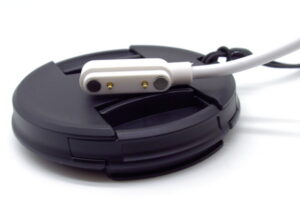
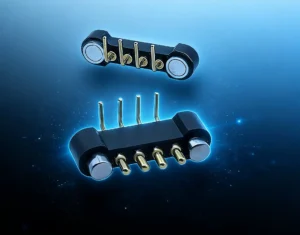
Not every magnetic charger works the way Apple’s does. Some wearables use a magnetic pogo pin connector, where magnets pull the two halves into alignment and spring-loaded pins press against flat contacts to carry the current. The Apple Watch puck charges wirelessly instead, so a pogo pin cable will not fit it. Device makers also face a design choice between a magnetic interface and a physical port, a trade-off CTP covers in its comparison of magnetic connector vs USB-C interfaces.
Anker and Belkin, which both sell Apple Watch accessories, say the watch uses a proprietary variation of wireless charging, not the Qi standard that phones use. That makes the phrase "without a magnetic charger" mean three different things. Without Apple’s brand of cable: yes, possible.
Without any cable on hand: you must borrow or buy one. Without a magnet at all: I found no workaround for current models. If you only need a stopgap tonight, borrowing a friend’s genuine Apple cable is the fastest route.
Does an Apple Watch charge on a regular Qi wireless pad?
No. A pad built for phones will not charge an Apple Watch. Belkin states that phone-style Qi chargers use different charging protocols from the watch. Anker adds that the watch needs the exact alignment that Apple’s magnetic puck provides.
The coil size and position differ between a phone pad and the watch, so a phone pad often energizes nothing. Multi-device stations that list Apple Watch support are different. They include a puck designed for the watch, so check the product page for that exact claim and for certification wording before buying. Apple also sells a MagSafe Duo Charger that works with the watch, and Apple Support mentions it in its charging guidance. A plain iPhone MagSafe pad is not the same product.
How do you charge an Apple Watch with a third-party charger?
- Pick a certified charger. Look for Apple certification (MFi) on the box or product page.
- Connect power. Plug a stand into a wall adapter, or a puck cable into a USB-C port, a laptop, or a power bank.
3.xxPlace the watch . Rest the back of the watch on the puck. The magnets pull it into position.
4. Check the screen. A lightning bolt appears on the face when the magnets align, per Apple Support. If it does not, reposition the watch.
5. Leave it alone. Apple says a dead watch may need up to 30 minutes before the screen turns on.
6. Avoid using the watch. Apple notes charging takes longer with the display on or while installing updates.
Can a laptop, iPad, or iPhone charge an Apple Watch?
A laptop or tablet can charge it, but only through a magnetic puck cable. The device supplies power. The puck still does the charging. Macworld has noted that any device with a USB-C port can power the USB-C puck cable, and newer iPads qualify.
That means a laptop is a decent emergency source when you have a puck but no wall adapter. Whether a given iPhone supplies enough power through its own USB-C port for the watch is a separate question I could not verify here. Anker mentions iPhone-based charging as an option, but it gives no model list.
Will fast charging work without Apple’s cable?
Usually not. Apple states that fast charging requires its USB-C Magnetic Fast Charging Cable, which you can spot by the USB-C connector and the aluminum around the puck. A third-party puck may still charge the watch, but at standard speed.
Apple lists these times for its own cable and a 20W USB-C adapter (Apple Support, published September 17, 2026):
• Series 10 and later: 0% to 80% in about 30 minutes.
• Series 7, 8, 9, SE 3, and Ultra 3 and later: 0% to 80% in about 45 minutes.
• Ultra and Ultra 2: 0% to 80% in about 1 hour.
• 15 minutes of charging: up to 12 extra hours on Series 12, up to 18 hours on Ultra 4, up to 8 hours on SE 3.
The adapter must be an Apple 18W to 140W USB-C model or a third-party USB-C adapter with USB-PD at 5W or more. Chargers marked "WPT" on the aluminum puck do not support fast charging.
Why won’t my Apple Watch charge on a third-party charger?
The usual causes are misaligned magnets, a dirty watch back, or an unsupported accessory. Apple says a message about an unsupported accessory means the charger is not recognized. Start with the stock cable to find out whether the watch or the charger is at fault.
Try these fixes in order:
- Clean the back of the watch and the puck with a dry cloth.
- Reposition the watch until the lightning bolt appears.
- Test a different cable and a different USB power adapter.
- On a 44mm, 45mm, or 49mm watch using a dock or MagSafe Duo, lay the charger flat or change its angle.
- On Apple Watch Ultra or later, remove the band if the watch will not connect on a flat dock.
- Force restart by holding the side button and Digital Crown for at least 10 seconds.
If you bought a WPT-compliant charger in China or Indonesia for an incompatible watch, Apple says an "Unable to charge" message appears.
Are cheap uncertified Apple Watch chargers safe?
I found no Apple test data on uncertified chargers, so the safest advice is to buy certified. Apple’s own support pages assume you use its cables or certified accessories, and a charger that triggers an unsupported-accessory message gives you a clear warning sign.
**Pros of certified third-party chargers
• Come in stands, 3-in-1 stations, and power-bank forms Apple does not sell.
• Can replace a lost cable the same day.
Cons
• Fast charging is not guaranteed because Apple ties it to its own cable.
• Fit varies with watch size, case, and band.
When does this advice not apply?
This advice does not apply when the watch itself is faulty, when you need fast charging, or when you live in a region that sells WPT-compliant chargers. If a known-good Apple cable also fails to charge the watch, the problem is the watch, not the substitute. Contact Apple Support.
If you need the fastest top-up, buy or borrow Apple’s USB-C Magnetic Fast Charging Cable and a USB-PD adapter. Skip the substitutes in that case. Also skip them for any watch with a damaged back, because a cracked sensor window should be checked by Apple.
This guide covers the Apple Watch only. If you are building a wearable of your own, the charging interface is a different problem, because device size, sealing, and how often a person docks the device all shape the choice. CTP’s range of magnetic charging cables for smart wearables shows the formats available, and its wearables and consumer electronics application page covers interfaces designed around device size and user interaction. Teams that need the connector, cable, and USB or Type-C end delivered as one finished part can start with custom magnetic cable assemblies.