Quick answer: USB-C is best for high power and universal compatibility. Wireless charging is best for convenience and fully sealed devices. A magnetic connector is best for compact, waterproof devices that are docked often and need power and data in a small space. The right choice depends on power level, device size, operating environment and how often the device is connected.
What Is Each Charging Interface?
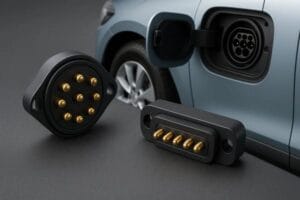
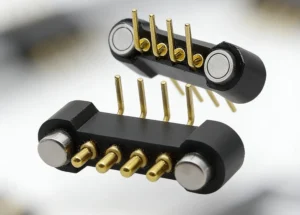
Magnetic connector: A magnetic connector uses magnets to align and hold two halves together. Spring-loaded pogo pin contacts then carry power, data or both. Magnets provide the alignment and holding force, while the pins make the electrical connection. For a deeper explanation, read What Is a Magnetic Connector and How Does It Work? and What Is a Magnetic Pogo Pin Connector?
USB-C: USB-C is a reversible, standardized connector. It supports both power and data, and with USB Power Delivery it can charge everything from earbuds to laptops.
Wireless charging: Wireless charging, usually based on the Qi standard, transfers power through coils by induction, with no physical contact. Qi2 adds magnetic alignment to improve efficiency. The newer Qi2.2 specification supports 25W transfer and is aimed at modern USB-C power adapters.
Magnetic Connector vs USB-C vs Wireless Charging: Comparison Table
| Factor | Magnetic Connector | USB-C | Wireless (Qi2) |
|---|---|---|---|
| Power | Low to medium; depends on pin design | Low to very high (up to 240W with PD 3.1) | Low to medium (up to 25W with Qi2.2) |
| Energy efficiency | High (direct contact) | Highest | Lower; some energy is lost as heat |
| Data transfer | Supported with multi-pin designs | Excellent | Not supported |
| Waterproof design | Easy to seal; no open port | Needs port sealing | Easiest; fully enclosed |
| Alignment | Self-aligning by magnet | Manual plugging | Magnetic with Qi2, otherwise loose |
| Space needed | Very small | Medium | Large (coil area) |
| Cost | Medium | Low | Medium to high |
| Best for | Wearables, medical, industrial, IoT | Phones, laptops, general electronics | Phones, earbuds, desk charging |
Power and Charging Speed
USB-C is the clear winner for power. It is the only one of the three that can deliver laptop-level wattage. Wireless charging has improved, but it usually trails a good cable in top speed. A magnetic connector fits low-to-medium power products such as smartwatches, handheld terminals and beauty devices. Current capacity per contact depends on pin size and housing design, so always confirm it against the product drawing. If your project needs higher current, see how to validate temperature rise and current derating and how to design the complete DC power path.
Efficiency and Heat
Direct contact wastes less energy than induction. Wireless systems lose part of the energy as heat across the air gap, which matters in small devices with limited cooling. Magnetic connectors and USB-C both make a direct electrical connection, so they run cooler for the same power level.
Durability and Water Resistance
USB-C ports collect lint and moisture, and the plug wears through repeated insertion. The USB-C specification rates the connector for around 10,000 mating cycles. A magnetic connector has no deep cavity, so it is easier to seal against water and dust, and the magnet lets the cable break away safely if it is pulled. Cable reliability also depends on construction, so read about conductor, jacket and overmold and strain relief and cable exit design. Wireless charging needs no exposed contacts at all, which makes it the simplest option for fully enclosed designs.
Size and Design Freedom
Wireless charging needs space for a coil and shielding. USB-C needs a port with enough depth and mechanical support. A magnetic connector can be only a few millimeters thick, which is why it dominates in smartwatches, hearing devices and slim wearables. See our application pages for smart wearables and consumer electronics, medical devices and smart home and IoT.
Cost
USB-C is the cheapest at volume thanks to standard parts. Magnetic connectors cost more because they add magnets and tighter tolerances. Wireless charging adds coils, control electronics and often certification costs. For custom projects, a sample approval checklist helps avoid costly redesigns before pilot production.
How to Choose the Right Interface
- Choose USB-C if you need high power, fast data and compatibility with existing chargers.
- Choose wireless (Qi2) if you want maximum convenience and a fully sealed enclosure.
- Choose a magnetic connector if your device is small, needs a waterproof design, is docked frequently, or needs custom pin counts for power plus data. Browse our magnetic connectors or magnetic cable assemblies.
- Combine them where it makes sense. Many products use USB-C on the charger side and a magnetic connector at the device.
Frequently Asked Questions
Is a magnetic connector better than USB-C?
Not in every case. USB-C is better for high power and universal compatibility. A magnetic connector is better for compact, waterproof and frequently docked devices.
Is wireless charging slower than wired charging?
Usually yes. Wired connections generally deliver higher power with less energy loss, although Qi2.2 narrows the gap for phones.
Can a magnetic connector transfer data?
Yes. Multi-pin designs can carry data alongside power, depending on the pin map and cable design.
Are magnetic connectors waterproof?
They can be. Because there is no open port, they are easier to seal, but the actual rating depends on housing, sealing method and testing.
Can I get a custom magnetic connector for my product?
Yes. CTP supplies custom magnetic connectors and cable assemblies for OEM and ODM projects, including pin map review, samples and validation.
Get the Right Interface for Your Project
If you are comparing interfaces for a new device, send your pin map, voltage, current, available space and drawings. The CTP engineering team will review them and recommend a suitable structure.