For years, charging meant fumbling with a port, pushing a plug in, and hoping the cable survived another month of bending and tugging. Magnets changed that. Today, two related but very different ideas share the “magnetic charging” label: magnetic connectors, which use magnets to hold a physical, wired contact together, and MagSafe-style designs, which use magnets to align a device with a wireless charger. Knowing the difference helps you choose the right accessory and avoid disappointment.
What Is a Magnetic Connector?
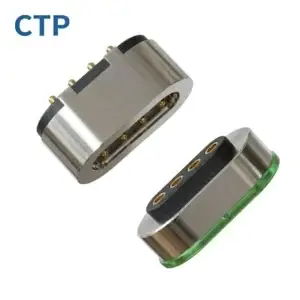
A magnetic connector is a cable end that snaps onto a device using magnets, while electricity still flows through metal contacts, usually spring-loaded magnetic pogo pins or flat pads. The original example is Apple’s MagSafe laptop charger, introduced in 2006. If someone tripped over the cable, the connector popped off instead of dragging the laptop to the floor. Microsoft’s Surface Connect and many third-party magnetic USB-C or Lightning tips work on the same principle.
Key characteristics
- Wired power delivery, so there is no wireless conversion loss
- Can carry high wattage, which suits laptops and fast charging
- Often supports data transfer as well
- Detaches safely under a sudden pull
- Requires matching contacts on the device or an adapter plugged into the port
What Is a MagSafe-Style Design?
MagSafe-style charging, popularized by the iPhone 12 in 2020, is different. A ring of magnets in the phone aligns it perfectly with a wireless charging coil in the charger. Power moves by inductive (Qi-style) wireless charging, not through metal contacts. The industry has since standardized this idea as Qi2, which adds a magnetic power profile so that compatible phones and chargers from different brands can snap together. Many Android phones now ship with Qi2 support, and others use magnetic cases to gain the same behavior.
Key characteristics
- Wireless power with no port wear
- Magnets ensure correct coil alignment, which improves efficiency compared with older loose-placement pads
- Supports an ecosystem of wallets, stands, car mounts, and grips
- Generally slower than a good wired connection, with typical speeds of around 15W and newer Qi2.2 products going higher
- Produces more heat because wireless transfer is less efficient
Head-to-Head Comparison
| Factor | Magnetic Connector | MagSafe-Style Wireless |
|---|---|---|
| Power transfer | Wired, through contacts | Wireless, through induction |
| Charging speed | Usually higher | Usually moderate |
| Efficiency | High | Lower, with more heat |
| Port wear | Reduced if adapter is used | None |
| Data transfer | Often possible | Not supported |
| Use while charging | Easy with cable attached | Phone is tied to the charger |
| Accessory ecosystem | Limited | Very broad (mounts, wallets, stands) |
| Standardization | Often proprietary | Qi2 gives broad compatibility |
| Dust and moisture | Exposed contacts can corrode | Sealed surface, fewer failure points |
Advantages and Drawbacks
Magnetic connectors
Pros: fast, efficient charging; strong safety release; can protect the device port from daily wear.
Cons: exposed contacts can collect dirt or oxidize; many designs are proprietary; adapters left in a port can snag or break; cheap versions may have weak magnets or poor power regulation.
MagSafe-style designs
Pros: effortless one-handed attachment; clean, port-free design; huge accessory range; cross-brand compatibility through Qi2.
Cons: slower and warmer than wired charging; the phone must stay on the charger; thick cases can weaken the magnetic hold; strong magnets can interfere with items such as some cards or medical devices, so keep reasonable distance.
Which Should You Choose?
- Choose a magnetic connector if you want maximum speed, need data, or are charging a laptop or power-hungry device. You can explore magnetic pogo pin connectors to find the right fit.
- Choose MagSafe-style charging if convenience matters most: desk and bedside charging, car mounts, and a flexible accessory ecosystem.
- Use both for the best experience: wireless magnetic charging for routine top-ups, and a wired connection when you need a quick, full charge.
Safety and Buying Tips
- Buy certified products. For Qi2, look for the official Qi2 logo.
- Avoid unbranded magnetic cables with no wattage ratings, since they can overheat.
- Keep contacts clean and dry.
- Match case thickness to the charger. Magnet-ready cases hold far better than ordinary ones.
- Keep strong magnets away from pacemakers and other sensitive devices, and follow manufacturer guidance.
The Future
Both approaches are converging. USB-C is becoming the common wired standard, while Qi2 is making magnetic wireless charging universal across brands. Expect faster wireless speeds, better thermal control, and more magnetic accessories, while wired magnetic connectors will remain valuable where raw power and reliability are the priority.
Conclusion
Magnetic connectors and MagSafe-style designs both use magnets to remove friction from charging, but they solve different problems. Connectors deliver speed and efficiency over a wire, while MagSafe-style systems offer cable-free convenience and a rich accessory world. The best choice depends on whether you value speed or simplicity, and for many people the answer is a bit of both. To see wired magnetic options in detail, visit MagneticPogo.com.